
Updated on July 13, 2026
When a domestic vendor contacts you claiming they haven't received payment, it almost always falls into one of two situations:
- The payment is still on its way — it's within the normal processing window and no action is needed yet.
- Something requires your attention — the payment was declined, the vendor hasn't processed a Secure Card, or funds went somewhere unexpected.
This article walks you through how to tell which situation you're in, and exactly what to do.
Please note that this article focuses on domestic payments. For payments with international vendors, please view: International Vendor Says They Haven't Received Payment
Check the Payment Status in Prendio
Follow the Path for Your Payment Status
Payment Status: “Sent” (Secure Card / Virtual Card)
Payment Status: “Paid” or “Settled”, Vendor Still Claims Not Received
Payment Status: Failed, Declined, or Voided
When to Contact Prendio Support
Payment Timelines
|
Before you dig in — check your payment timelines Many “payment not received” calls happen because the payment is still within its normal window. Vendors sometimes follow up before funds have had time to post. |
Domestic payment method timelines (from batch approval):
|
Payment Method |
Typical Timeline |
Notes |
|
Secure Card |
~2 business days |
Funds deliver only after the vendor processes the card from the remittance email. |
|
ACH |
~4 business days |
Vendor's bank may take 1–2 additional days to post after “Paid” status. |
|
Check |
~7 business days |
Prendio cannot track checks once mailed via USPS. |
Note: Batches submitted before 6:00 PM ET / 3:00 PM PT begin processing the same business day. Batches submitted after the cutoff begin processing the next business day. Banking holidays and weekends extend timelines.
Check the Payment Status in Prendio
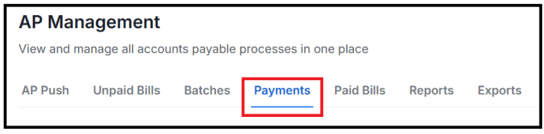
Navigate to the Payments tab and locate the payment in question:
The Payment Status shown is your first signal for what's happening:
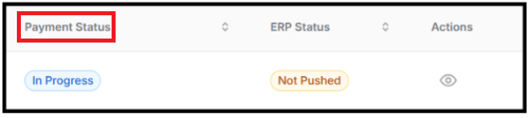
Below is a table with the different Payment Statuses along with definitions and next steps:
|
Status |
What It Means |
What to Do |
|
Funding Initiated |
Prendio is preparing funds for the batch. Seen briefly after batch submission. |
No action needed. |
|
Funding Complete |
Funding secured. Payment is about to be sent to the payment provider. |
No action needed. Payment will move to the next stage shortly. |
|
In Progress |
Payment is being transmitted to the payment provider. |
No action needed. Share the expected timeline with your vendor. |
|
Processing |
ACH file sent to the bank (ACH) or card transaction is being processed (Secure Card). Funds are in transit. |
Normal. Allow up to 4 business days from batch approval for ACH. No action needed. |
|
Printing |
Check only. Check is being printed and prepared for mailing. |
No action needed. Check will move to Mailed once handed to USPS. |
|
On Hold |
Payment has been paused by the payment provider. |
Contact Prendio Support with the Payment ID and batch number. On Hold payments cannot be resolved from the Prendio interface. |
|
Sent |
Secure Card only. Remittance email delivered to vendor. Vendor has NOT yet processed the card. |
See Section 2A — the vendor must take action on the email to receive funds. |
|
Mailed |
Check only. Check was printed and handed to USPS. |
Allow 7 business days from batch approval. Prendio cannot track checks once mailed. |
|
Paid |
ACH: funds approved by receiving bank. Secure Card: vendor has charged the card. |
Payment is complete at the provider level. Allow 1–2 additional business days for the vendor's bank to post the deposit. |
|
Settled |
Final cleared state for all payment methods. Funds fully reconciled. |
See Section 2B if the vendor still claims non-receipt. |
|
Failed / Declined |
Payment did not complete. No funds were sent. |
See Section 2C — the payment needs to be corrected and resubmitted. |
|
Returned |
ACH or Secure Card only. Funds were sent but returned by the receiving bank. |
See Section 2C — treat as a failed payment. Confirm banking details with the vendor before resubmitting. |
|
Voided |
Check only. Check was canceled before or after mailing. |
See Section 2C — contact Prendio Support if a stop payment is needed before reissuing. |
Follow the Path for Your Payment Status
Payment Status: “Sent” (Secure Card / Virtual Card)
|
Important: “Sent” does not mean the vendor received money. For Secure Card payments, “Sent” means the remittance email was delivered to the vendor's email address — but the vendor must click the secure link in that email and enter the card details to actually receive payment. Until they do, no funds have been delivered. |
What to check and do:
- Ask your vendor to check their email inbox and spam/junk folder for an email from Edenred. The subject will reference a payment notification.
- Confirm the vendor understands they need to act on the email. The email contains a secure link where the vendor retrieves the card number, CVV, and expiration date. They must process this like any other credit card transaction.
- Verify the email address on file is correct. In Prendio, check the supplier's remit email address. If it's wrong, contact Prendio Support to update it and request a resend.
How long has the card been in “Sent” status?
- 0–5 days: Normal. Ask the vendor to check for the Edenred email and process the card.
- 6–12 days: Contact Prendio Support to request a remittance email resend. Confirm the correct vendor email address before calling.
- 12+ days: The card may be stale. Contact Prendio Support immediately — the card may need to be voided and reissued.
- Confirm the vendor is willing and able to accept Secure Card payments.
- Check whether the card has been in “Sent” status for more than 12 days (stale — void and reissue required).
- If the vendor cannot or will not accept Secure Cards, contact Prendio Support to switch the payment method to ACH or check.
|
What to tell your vendor “We sent your payment as a Secure Card. You should have received an email from Edenred with a secure link to access the card details. Please check your inbox and spam folder for that email, then use the link to process the card as you would any credit card payment. If you can't find the email, let me know and we'll have it resent.” |
Status: “Paid” or “Settled”, Vendor Still Claims Not Received
If the payment shows Paid or Settled, the funds were delivered. Here are the most common reasons a vendor may not realize it:
Vendor's bank hasn't posted the deposit yet
Even after Prendio shows “Paid,” ACH deposits can take 1–2 additional business days to appear in the vendor's account. Ask the vendor to check again the following business day.
Vendor is checking the wrong bank account
If the vendor has multiple accounts at the same bank, the payment may have gone to a different account than expected. Ask them to confirm the last four digits of the account number on file.
Vendor doesn't recognize the payment descriptor
Bank statements may show “Edenred” or “Prendio” as the sender rather than your company name. Share the payment date, exact amount, and payment ID with your vendor so their accounting team can locate it.
Remittance notification went to spam
The payment notification email may have landed in the vendor's spam or junk folder. This is separate from the actual payment — for ACH and Check, the funds were still delivered. Ask the vendor to check spam and mark future emails from Edenred as trusted.
If none of the above resolve the issue, contact Prendio Support with the Payment ID, batch number, and vendor name. Operations can investigate on the payment provider side.
Status: Failed, Declined, or Voided
A failed, declined, or voided payment means the transaction did not complete. The vendor did not receive any money, and no duplicate payment occurred. The payment needs to be corrected and resubmitted.
For ACH failures (return codes R01–R29)
ACH failures include a return code that explains why the bank rejected the payment. Common causes include incorrect routing numbers, closed accounts, or account number mismatches.
→ See the ACH Troubleshooting Guide for a full list of return codes, what each means, and step-by-step resolution instructions for each scenario.
For Secure Card failures
Virtual card declines can occur when the vendor's payment terminal cannot process the card, or when the card has expired or gone stale. Common next steps:
For Check failures
Checks can be voided before or after mailing. If the check was voided before mailing, no funds were sent and a new payment can be created. If voided after mailing, contact Prendio Support — a stop payment may be needed before reissuing.
When to Contact Prendio Support
Contact Prendio Support and have the following information ready: Payment ID, Batch ID, supplier name, and current payment status.
- Payment has exceeded the expected timeline for the payment method (see timeline table above).
- Virtual card has been in “Sent” status for 6 or more days.
- ACH payment failed and you need help interpreting the return code or the issue persists after correcting details.
- Payment shows “Paid” or “Settled” but the vendor confirms they have genuinely not received funds after following the steps in Section 2B.
- You believe there may be a duplicate payment.
- A vendor is threatening a credit hold or collections action — flag this as urgent when you contact support.
To contact support, please complete the Support Ticket Request form using the link below:
Quick Reference Table
Below is a table with different situations along with the likely cause and next steps:
|
Situation |
Likely Cause |
First Action |
|
Payment in progress, vendor following up early |
Still within normal processing window |
Share timeline table. No action needed. |
|
Virtual card shows “Sent” for days |
Vendor hasn't processed the email link |
Ask vendor to check inbox/spam for Edenred email. |
|
Payment shows “Paid” but vendor denies receipt |
Bank posting delay, wrong account, or spam |
Confirm account last 4 digits; share payment date/amount. |
|
ACH payment failed with return code |
Invalid banking details or account issue |
See ACH Troubleshooting Guide. |
|
Virtual card declined or stale (12+ days) |
Vendor can't process card or card expired |
Contact Prendio Support to void and reissue. |
|
Vendor threatening collections/credit hold |
Urgent — escalation needed |
Contact Prendio Support immediately, flag as urgent. |