
Updated on July 15, 2026
When an international vendor contacts you about a missing payment (SWIFT Wire, iACH, SEPA (iACH Direct2Bank), the cause is usually one of three things:
-
The payment is still within its normal transit window, there was an error with the payment details.
-
The payment was rejected by the receiving bank.
This article walks you through how to identify which situation applies and what to do.
Please note that this article focuses on international payments. For payments with domestic vendors, please view: Domestic Vendor Says They Haven't Received Payment
Check the Payment Status in Prendio
Follow the Path for Your Situation
Payment Status: "Settled" — Vendor Still Claims Not Received
Payment Status: "Rejected" — Error Code Troubleshooting
Supplier Account Shows "Pending"
Choosing the Right International Payment Method
Quick Reference: International Banking Details
When to Contact Prendio Support
Check Your Payment Timelines
International payments take longer than domestic payments, and timelines vary by method. Before investigating further, confirm whether the payment is still within its expected window.
|
Payment Method |
Typical Timeline |
Cost |
Notes |
|
SWIFT Wire |
1–5 business days |
~$10 per payment |
Works for all countries and currencies. Fastest option when speed matters. |
|
iACH (International ACH) |
2–5 business days |
~$1–2 per payment |
Available in 60+ countries. Cheaper but not available everywhere. |
|
SEPA (Europe / EUR only) |
1 business day (standard) or near-instant (SEPA Instant) |
Low cost |
Euro-denominated payments to European accounts only. |
Note: These timelines begin after your batch reaches "Funding Complete" status, not from the moment of batch submission.
Check the Payment Status in Prendio
Navigate to the Payments tab and locate the payment: 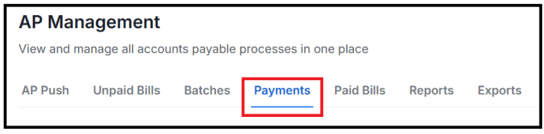
The current Payment Status tells you what path to follow in the table below: 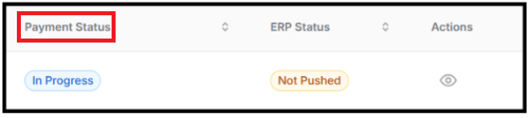
|
Status |
What It Means |
What To Do |
|
Funding Initiated |
Prendio is preparing funds for the batch. |
No action needed. Seen briefly after batch submission. |
|
Funding Complete |
Funding secured. Payment is being sent to Corpay. |
No action needed. Payment will move to In Progress shortly. |
|
In Progress |
Payment transmitted to Corpay. General in-flight stage. |
Normal for recently submitted batches. No action needed. |
|
Processing |
Payment accepted by Corpay and actively moving through the payment network. |
Normal. Allow the full timeline for the payment method before following up. |
|
Posting (SWIFT Wire only) |
Payment is being applied to the beneficiary account by the receiving bank. |
Normal. Typically resolves within 1 business day. |
|
On Hold |
Payment paused by Corpay or the payment network. |
Contact Prendio Support with the Payment ID and batch number. On Hold payments cannot be resolved from the Prendio interface. |
|
Settled |
Payment completed. Funds were delivered to the beneficiary. |
See Section 3A if vendor still claims non-receipt. |
|
Failed / Canceled |
Payment did not complete. No funds were sent. |
See Section 3B — a rejection code in the payment details explains the cause. |
|
Returned |
Funds were sent but returned by the receiving bank. |
See Section 3B. Verify banking details with supplier before resubmitting. |
|
Pending (Account) |
Supplier's international account hasn't been fully approved/synced. |
See Section 3C — may be a Corpay approval or sync issue. |
Follow the Path for Your Situation
Payment Status: "Settled" — Vendor Still Claims Not Received
If the payment shows Settled, funds were delivered through Corpay. Here are the most common reasons a vendor may not see the payment yet:
Bank posting hasn't completed
Even after Prendio shows Settled, the vendor's local bank may take 1–2 additional business days to post the deposit — especially for SWIFT Wire, where correspondent banks are involved in the transfer chain. Ask the vendor to check their account again the following business day.
Vendor is checking the wrong account
International vendors sometimes have multiple accounts in different currencies. Confirm the account number and currency the payment was sent to and ask the vendor to verify it matches the account they're checking.
Payment descriptor is unfamiliar
The vendor's bank statement may show Corpay or an intermediary bank name rather than your company name. Share the payment date, exact amount, and currency with your vendor's accounting team so they can locate it by value.
Correspondent bank delay (SWIFT Wire)
SWIFT Wire payments route through one or more correspondent banks before reaching the beneficiary. In some cases, a correspondent bank may hold the payment briefly. If the payment has been Settled for more than 5 business days and the vendor still cannot locate the funds, contact Prendio Support — Operations can open a trace with Corpay.
Payment Status: "Rejected" — Error Code Troubleshooting
|
No funds were sent. A rejected international payment means the transaction did not complete. No money reached the vendor, and no duplicate payment occurred. The issue must be identified and corrected before resubmitting. |
Locate the rejection reason code in the payment details. The table below covers the most common codes:
|
Code |
Meaning |
Likely Cause |
Who Can Fix |
|
AC01 |
Incorrect account number |
Account number entered does not match any account at the receiving bank |
You — verify and correct account number with supplier |
|
AC04 |
Account closed |
The supplier's bank account is no longer active |
Supplier — must provide new account details |
|
AC06 |
Account blocked |
Account is frozen or restricted and cannot receive payments |
Supplier — must resolve with their bank |
|
RC01 |
Bank identifier incorrect |
SWIFT/BIC code is wrong or incorrectly formatted (must be 8 or 11 characters) |
You — verify SWIFT/BIC code with supplier |
|
RC08 |
Invalid clearing system member identifier |
Routing code is not valid for the supplier's country (common with iACH) |
You — get correct local routing code from supplier, or switch to SWIFT Wire |
|
RR05 |
Regulatory information invalid |
Required fields for the destination country are missing or incorrect |
Contact Prendio Support — Operations can advise on required fields |
|
FF07 |
Invalid purpose |
Payment purpose/reason field is missing or blank |
You — ensure the payment purpose field is completed before resubmitting |
|
PAYMENTMETHODS_NOT_IN_VALUESET |
Payment method code mismatch |
iACH (code E) selected when supplier requires SWIFT Wire (code W), or vice versa |
Contact Prendio Support — Operations updates the supplier payment method |
Common scenario: Wrong payment method (PAYMENTMETHODS_NOT_IN_VALUESET)
This is the most common international payment error. It occurs when the payment method configured for the supplier in Prendio doesn't match what Corpay expects — for example, iACH selected when the supplier requires SWIFT Wire.
To resolve: contact Prendio Support and let them know whether the supplier requires Wire or iACH. Operations will update the supplier configuration. Once corrected, you can resubmit the payment.
Common scenario: Invalid routing code for iACH (RC08)
This happens when a domestic routing number is used for an international payment, or when the routing code format doesn't match the supplier's country. The fix is to contact your supplier and ask specifically for their routing code for international ACH (iACH) payments — not their wire routing number. If you cannot get a valid iACH routing code, switching to SWIFT Wire is the simplest alternative.
Supplier Account Shows "Pending"
If a supplier's international payment account is stuck in Pending, it usually means one of two things:
- Corpay has not yet approved the account. Check whether your supplier received and completed the Corpay enrollment request. If not, ask them to check their email (including spam) for a message from Corpay.
- Corpay approved the account, but Prendio hasn't synced the status. If your supplier has confirmed Corpay approval but Prendio still shows Pending, this is a sync issue. Contact Prendio Support and provide the supplier name and the date Corpay sent the approval confirmation.
Do not attempt to submit a payment to a supplier whose account is still in Pending — the payment will not process.
Choosing the Right International Payment Method
If you're unsure whether to use SWIFT Wire or iACH for a supplier, use this decision path:
- Is the payment in EUR to a European account? → SEPA (iACH Direct2Bank) is the fastest and cheapest option.
- Is iACH available for the supplier's country? → Check with Prendio Support or your account manager. If yes and the payment is not urgent, iACH is the more cost-effective choice.
- Is the payment urgent, or is iACH unavailable for the country? → Use SWIFT Wire. It works for all countries and currencies.
- Does the supplier have a preference? → Some banks only accept SWIFT Wire. When in doubt, ask the supplier which method they prefer before setting up their payment details.
|
Note on currency: SEPA only supports EUR payments. If an invoice is in USD but the supplier's account is configured for EUR (SEPA), the payment will fail with a currency mismatch error. In that case, switch the payment method to SWIFT Wire, which supports multiple currencies. |
Quick Reference: International Banking Details
When setting up a new international supplier or correcting a rejected payment, the following details will likely be required from the supplier:
|
Field |
SWIFT Wire |
iACH |
|
Bank identifier |
SWIFT/BIC code (8 or 11 characters, e.g. NWBKGB2L) |
Local routing code for supplier's country/region |
|
Account number / IBAN |
IBAN (if applicable) or local account number |
Local account number or IBAN |
|
Beneficiary name |
Must match the name on the bank account exactly |
Must match the name on the bank account exactly |
|
Currency |
Supports multiple currencies |
Depends on country — confirm with supplier |
Always verify payment details directly with the supplier before submitting — do not rely solely on details from an invoice, especially for first-time payments.
When to Contact Prendio Support
Have the following ready: Payment ID, Batch ID, supplier name, destination country, payment method, and current status.
- Payment has exceeded the expected timeline and status has not progressed (SWIFT Wire 5+ days, iACH 5+ days, SEPA 2+ days).
- Rejection code is not in the table above or the issue persists after correcting details.
- Error code is PAYMENTMETHODS_NOT_IN_VALUESET — Operations must update the supplier's payment method configuration.
- Supplier account is stuck in Pending and Corpay has already approved it.
- Payment shows Settled but vendor cannot locate funds after 5+ business days.
- You need a payment trace for a SWIFT Wire that appears lost in the correspondent banking chain.
- A vendor is threatening a credit hold or service disruption — flag as urgent when contacting support.
To contact support, please complete the Support Ticket Request form using the link below:
Quick Reference Table
Below is a table with different situations along with the likely cause and the first action to taek for next steps:
|
Situation |
Likely Cause |
First Action |
|
Vendor following up — payment in progress |
Still within normal transit window |
Share timeline table. No action needed yet. |
|
Payment settled, vendor can't find funds |
Bank posting delay or wrong account checked |
Confirm account/currency; ask vendor to wait 1–2 more days. |
|
PAYMENTMETHODS_NOT_IN_VALUESET error |
Wrong payment method code (Wire vs. iACH) |
Contact Prendio Support — Operations updates supplier config. |
|
RC08 — invalid routing code |
Domestic routing used for iACH, or wrong country format |
Get correct international routing code from supplier, or switch to SWIFT Wire. |
|
AC01 / AC04 — account error |
Wrong account number or closed account |
Contact supplier for correct/active account details. |
|
Supplier account stuck in Pending |
Corpay approval pending or sync failure |
Confirm Corpay enrollment; contact Prendio Support if already approved. |
|
Vendor threatening credit hold |
Urgent — escalation needed |
Contact Prendio Support immediately, flag as urgent. |